2022年6月20日 星期一

SoftEther L2 Bridge VPN (2022修正版)

這篇文章是我寫的,2017寫的文章,跟2022年相較,有些部份需要做調整。

https://www.netadmin.com.tw/netadmin/zh-tw/technology/C3797EE717E145199F4694D0C568B0AA

由於VPN Bridge在建立local bridge時,綁定的網路卡一直為offline狀態。因此要改用VPN Server來做相關的設定。但設定方式沒有不同不用擔心。


在Branch的LAN端,我是用一台筆電介接RPI的eth0,但RPI的eth0也會抓到Headquarter的DHCP server給的IP資訊,造成RPI連外斷線。因此要將RPI的eth0設定固定IP,避免其取得DHCP時將default route指向DHCP給的gateway IP。

有很多方法都適用,我的習慣是編輯這個檔案:
/etc/network/interfaces
新增以下設定:
    auto eth0
    iface eth0 inet static
      address 192.168.0.10
      netmask 255.255.255.0
重開之後就會正常,當然你也可以systemctl restart networking
但有趣的是,它還是會自動抓到DHCP給的gateway IP,因此我們要將
default route刪除。
route delete default gw 192.168.0.254

當然,新的Pi OS有很多其它的設定方式,例如編輯
/etc/dhcpcd.conf
新增這一行:
interface eth0
static ip_address=192.168.1.10/24
記得要重啟dhcpd
systemctl restart dhcpcd.service 


2022年6月3日 星期五

windows 10 cli show intrface name and using bridgecreate (bridgedevicelist)


VPN Server>bridgedevice list

BridgeDeviceList 命令 - 获取可以在当地的网桥上使用的 LAN 卡一览

Microsoft (ID=1170327442)

Realtek Gaming GbE Family Controller (ID=2635375448)

Supereal network (ID=0934702716)

VMware Virtual Ethernet Adapter (ID=1905419454)

VMware Virtual Ethernet Adapter (2) (ID=0913673047)

命令成功完成。


VPN Server>bridgecreate

BridgeCreate 命令 - 创建本地的网桥连接

网桥虚拟 HUB 名称: vpn


目标网桥的设备名称: Microsoft


发生错误。(错误代码: 29)

找不到对象。

VPN Server>netsh interface show interface

"netsh": 命令未找到。

您可以使用 "HELP" 命令来查看一个可用的命令列表。

VPN Server>exit


C:\Program Files\SoftEther VPN Bridge>netsh interface show interface


管理狀態    狀態          類型             介面名稱

-------------------------------------------------------------------------

已啟用            已中斷連線          固定               乙太網路 3

已啟用            已中斷連線          固定               VPN - VPN Client

已啟用            已連線            固定               VMware Network Adapter VMnet1

已啟用            已連線            固定               VMware Network Adapter VMnet8

已啟用            已中斷連線          固定               乙太網路 4

已啟用            已連線            固定               乙太網路


C:\Program Files\SoftEther VPN Bridge>netsh interface ip show interfaces


Idx     Met         MTU          狀態                 名稱

---  ----------  ----------  ------------  ---------------------------

  1          75  4294967295  connected     Loopback Pseudo-Interface 1

 14          25        1500  connected     乙太網路

 15          35        1500  disconnected  VPN - VPN Client

 11          65        1500  disconnected  藍牙網路連線

  6          35        1500  disconnected  乙太網路 3

 21          35        1500  disconnected  乙太網路 4

 17          35        1500  connected     VMware Network Adapter VMnet1

  4          35        1500  connected     VMware Network Adapter VMnet8


C:\Program Files\SoftEther VPN Bridge>powershell

Windows PowerShell

Copyright (C) Microsoft Corporation. 著作權所有,並保留一切權利。


請嘗試新的跨平台 PowerShell https://aka.ms/pscore6


PS C:\Program Files\SoftEther VPN Bridge> Get-NetAdapter


Name                      InterfaceDescription                    ifIndex Status       MacAddress             LinkSpeed

----                      --------------------                    ------- ------       ----------             ---------

區域連線                  PPPoP WAN Adapter                            22 Disconnected 00-00-00-00-00-00          0 bps

乙太網路 4                RD9700 USB2.0 To Fast Ethernet Adapter       21 Disconnected 00-06-03-0F-0A-80       100 Mbps

VMware Network Adapte...1 VMware Virtual Ethernet Adapter for ...      17 Up           00-50-56-C0-00-01       100 Mbps

VPN - VPN Client          VPN Client Adapter - VPN                     15 Disconnected 5E-9E-06-F2-3E-98       100 Mbps

乙太網路                  Realtek Gaming GbE Family Controller         14 Up           B4-2E-99-EE-71-78         1 Gbps

藍牙網路連線              Bluetooth Device (Personal Area Netw...      11 Disconnected 00-1A-7D-DA-71-12         3 Mbps

乙太網路 3                Fortinet Virtual Ethernet Adapter (N...       6 Disconnected 00-09-0F-FE-00-01       100 Mbps

VMware Network Adapte...8 VMware Virtual Ethernet Adapter for ...       4 Up           00-50-56-C0-00-08       100 Mbps


PS C:\Program Files\SoftEther VPN Bridge> Get-NetIPInterface


ifIndex InterfaceAlias                  AddressFamily NlMtu(Bytes) InterfaceMetric Dhcp     ConnectionState PolicyStore

------- --------------                  ------------- ------------ --------------- ----     --------------- -----------

4       VMware Network Adapter VMnet8   IPv6                  1500              35 Enabled  Connected       ActiveStore

17      VMware Network Adapter VMnet1   IPv6                  1500              35 Enabled  Connected       ActiveStore

21      乙太網路 4                      IPv6                  1500              35 Disabled Disconnected    ActiveStore

6       乙太網路 3                      IPv6                  1500              35 Disabled Disconnected    ActiveStore

11      藍牙網路連線                    IPv6                  1500              65 Disabled Disconnected    ActiveStore

15      VPN - VPN Client                IPv6                  1500              35 Enabled  Disconnected    ActiveStore

1       Loopback Pseudo-Interface 1     IPv6            4294967295              75 Disabled Connected       ActiveStore

4       VMware Network Adapter VMnet8   IPv4                  1500              35 Disabled Connected       ActiveStore

17      VMware Network Adapter VMnet1   IPv4                  1500              35 Disabled Connected       ActiveStore

21      乙太網路 4                      IPv4                  1500              35 Enabled  Disconnected    ActiveStore

6       乙太網路 3                      IPv4                  1500              35 Enabled  Disconnected    ActiveStore

11      藍牙網路連線                    IPv4                  1500              65 Enabled  Disconnected    ActiveStore

15      VPN - VPN Client                IPv4                  1500              35 Enabled  Disconnected    ActiveStore

14      乙太網路                        IPv4                  1500              25 Enabled  Connected       ActiveStore

1       Loopback Pseudo-Interface 1     IPv4            4294967295              75 Disabled Connected       ActiveStore


PS C:\Program Files\SoftEther VPN Bridge> Get-NetIPInterface -PolicyStore persistentstore


ifIndex InterfaceAlias                  AddressFamily NlMtu(Bytes) InterfaceMetric Dhcp     ConnectionState PolicyStore

------- --------------                  ------------- ------------ --------------- ----     --------------- -----------

21      乙太網路 4                      IPv6                                                                Persiste...

15      VPN - VPN Client                IPv6                                                                Persiste...

6       乙太網路 3                      IPv6                                                                Persiste...

7       乙太網路 2                      IPv6                                                                Persiste...

11      藍牙網路連線                    IPv6                                                                Persiste...

4       VMware Network Adapter VMnet8   IPv6                                                                Persiste...

17      VMware Network Adapter VMnet1   IPv6                                                                Persiste...

14      乙太網路                        IPv6                                                                Persiste...

12      乙太網路 (核心偵錯工具)         IPv6                                                                Persiste...

21      乙太網路 4                      IPv4                                                                Persiste...


example:

BridgeCreate vpn /DEVICE:"乙太網路 4" /TAP:no 

VPN Server>bridgelist

BridgeList 命令 - 获得当地网桥连接列表

编号|虚拟 HUB 名称|网络适配器或 tap 设备名称                           |状态

----+-------------+----------------------------------------------------+----

1   |vpn          |Realtek Gaming GbE Family Controller (ID=2635375448)|离线

命令成功完成。


VPN Server>bridge

"bridge": 命令名称是模糊的。

指定的命令名称匹配以下多个命令:

 BridgeCreate     - 创建本地的网桥连接

 BridgeDelete     - 删除本地网桥连接

 BridgeDeviceList - 获取可以在当地的网桥上使用的 LAN 卡一览

 BridgeList       - 获得当地网桥连接列表

请更严格地重新指定命令名称。

VPN Server>bridgedelete

BridgeDelete 命令 - 删除本地网桥连接

删除虚拟网桥 HUB 的名称: vpn


删除网桥的设备名: Realtek Gaming GbE Family Controller (ID=2635375448)


命令成功完成。


2021年9月29日 星期三

新版Cacti 如何import舊版的template ( How new Cacti import template of old Cacti)

這一題我好像解過,但久了又忘了,做一個記錄,避免久了再忘。

簡單來說,Cacti的所有template的xml檔都有一段:hash_xxoooo的文字。以下例而言,06代表功能,0024代表版本。

hash_06002419414480d6897c8731c7dc6c5310653e

我們可以簡單查詢0024代表的是0.8.8版

cat /usr/share/cacti/include/global_arrays.php  | grep 0024

        '0.8.8'  => '0024',

        '0.8.8a' => '0024',

        '0.8.8b' => '0024',

我們要從Cacti 1.2.18 import 這些template,就要修改這些hash的內容,要從0024改成0102 (0102是從下面的指令抓出來的),

cat /usr/share/cacti/include/global_arrays.php  | grep 1.2.18

        '1.2.18'  => '0102',

以此例而言,要把hash_060024 改成 hash_060102

但一個一個改太笨,可以的話當然是sed一行搞定,可惜我功力不強,試不出來。只好寫小程式來處理,範例如下。

#!/bin/bash

from=`grep -oe 'hash_..0024' test.xml | sort | uniq`

for value in $from

do

    to=`echo $value | sed 's/0024/0102/g'`

    sed -i "s/$value/$to/g" "test.xml"

done

PHP的版本:

<?php

 $version = "0102";

 $fp = file("test.xml");

 $myfile = fopen("output.xml", "w");

 foreach($fp as $line)

 {

  if(preg_match("/hash_/",$line))

  {

   $pos = strpos($line, "hash_");

   $orig = substr($line,$pos,11);

   $new = substr($line,$pos,7);

   $newstring = $new.$version;

   $line = str_replace($orig,$newstring,$line);

  }

  fwrite($myfile, $line);

 }

 fclose($myfile);

?>

如果要從cli import template的話,可以使用下列指令:

php /usr/share/cacti/cli/import_template.php --filename output.xml


Cacti 異常的原因 ( Poller Output Table not Empty )

之前在RHEL8裝了Cacti,之後再手動升版,但一直異常。Cacti的圖常常畫不出來。

昨天終於找到原因。原因是用yum install cacti時,他在/etc/crontab裡面會新增Cacti的poller的設定。

但我之前是手動在/etc/cron.d裡面新增cacti的poller,所以我同時有兩個poller在跑。

當時常見的log如下:

2021/05/16 03:30:02 - POLLER: Poller[1] NOTE: Poller Int: '300', Cron Int: '300', Time Since Last: '0.26', Max Runtime '298', Poller Runs: '1'

然後經常有Poller Output Table not Empty的log:

2021/05/16 03:30:02 - POLLER: Poller[1] WARNING: Poller Output Table not Empty.  Issues: 39, DS[828, 828, 827, 827, 826, 826, 804, 804, 799, 799, 798, 797, 796, 795, 794, 793, 792, 791, 790, 814], Additional Issues Remain.  Only showing first 20

試了很多方法,找了很多方法都解決不掉,後來就跑去用LibreNMS了...

在找到原因後,回頭再check當時的log,真的一看就知道問題所在。難怪當時同時會有兩個spine在執行,但當下真的不覺得奇怪。只能說,找到答案之後回頭看一切都是那麼合理。

2021/05/16 03:30:02 - POLLER: Poller[1] DEBUG: About to Spawn a Remote Process [CMD: /usr/local/spine/bin/spine, ARGS:  -C '/usr/local/spine/etc/spine.conf' --poller=1 --first=0 --last=61 --mibs]

2021/05/16 03:30:02 - POLLER: Poller[1] DEBUG: About to Spawn a Remote Process [CMD: /usr/local/spine/bin/spine, ARGS:  -C '/usr/local/spine/etc/spine.conf' --poller=1 --first=0 --last=61]


2021年9月12日 星期日

如何使用vba下載郵件並上傳至伺服器

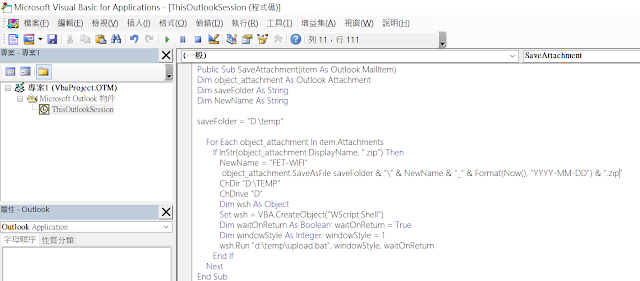
程式很簡單,監控outlook的郵件主旨,然後將符合主旨的附檔存下來(這部份很簡單就成功了,網路上很多可以參考的範例)。

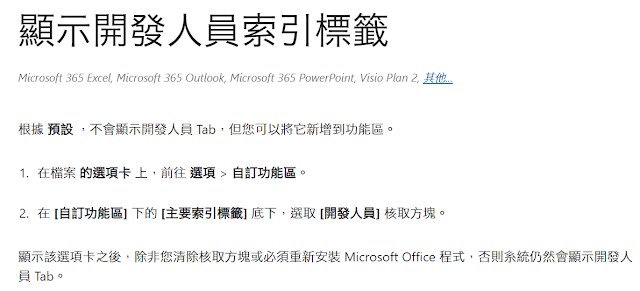
一開始當然是要讓outlook可以使用開發者功能,才能寫VBA程式。


接著我們開始建立專案,把程式寫好。


最後就是建立規則,這邊的關鍵是要『執行程式碼』,不是『執行程式』。


接著把附檔丟到我的linux server上,然後linux server會去檢查檔案是否存在,在的話把它匯入資料庫。
要在outlook開發程式只能用vba,但vba要呼叫tftp一直時好時壞。難怪前輩們都是用scp或sftp....

這邊簡單補充一下,一般是用excel先做測試,先開啟開發者功能,然後允許巨集,接著插入一個模組,把程式丟到模組,就可以測試了。測試完成後,再回到outlook,用alt+F11就可以開啟VBA編輯介面(建議outlook也要開啟開發者功能並允許使用巨集),接著產生新的outlook規則,然後呼叫程式碼(我之前一直選成呼叫應用程式)

但在公司不管用tftp或scp都失敗。(有幾次成功,但...不穩定的東西誰敢用)
在家裡用tftp跟scp倒是都成功。
看來是tftp client的問題嗎或者環境問題嗎?在公司換了一個tftp client,結果輕易成功了。Windows 10預設的tftp.exe 可能在AD環境執行有一些權限限制吧?

附上簡單範例範例:
Sub uploadfile()
ChDir "D:\TEMP" ' Make "D:\TEMP" the current folder.
ChDrive "D" ' Make "D" the current drive.
Dim wsh As Object Set wsh = VBA.CreateObject("WScript.Shell") Dim waitOnReturn As Boolean: waitOnReturn = True Dim windowStyle As Integer: windowStyle = 1 wsh.Run "d:\temp\upload.bat", windowStyle, waitOnReturn
end Sub

upload.bat的內容如下:
cd d:\temp
d:
tftp.exe -i 192.168.1.2 PUT "my test.xlsx"
另外有幾個要特別留意的問題,在處理過程中比較常遇到的,雖然排除了但我沒有認真回頭去看哪些不需要。
1、vba shell timeout
2、vba shell path
3、vba dir & driver
4、vba shell mode and WScript.Shell
5、chr 34 and double quote (") , and """" & 總之就是雙引號之類的問題


2021年3月9日 星期二

如何在librenms新增你想要抓的東西,例如記憶體使用量(率)、風扇轉數等等...

前言:

其實這個題目我寫的有點心虛,因為我對librenms其實不太熟...之前裝librenms就是裝好能用,然後定期更新而已。

直到這一次公司買了新的設備 Ericsson SSR 8010。librenms內建的模組沒有辦法抓到它記憶體使用量及風扇轉速,因此我只好以『自己』的方式來處理。如果有觀念錯誤的地方煩請指正或指點。

以下切入正題:

重要觀念:

在librenms要新增資料,有兩種方式:dicovery、poller。這兩者以我的認知而言,doscovery用在第一次新增裝置或之後設定rediscovery時使用,而poller則是用在設備上線後的維運。但以我這一次維護而言,mempools及storage在discovery及poller都要設定。但fanspeed及temperature只需要設定discovery...我也不知道為什麼。也許之後有機會再研究。

關於除錯:

先講除錯的部份,如果我們不曉得怎麼去看程式的輸出就無法除錯。因此除錯的部份是最重要的。

以discovery而言:

cd /opt/librenms

./discovery.php -h 74 -d -m mempools

以poller而言:

./poller.php -h 74 -d -m mempools

-h指的是設備編號,在設備的連結可以看出來。

-d代表debug,但資訊太多。我覺得不是很好用。

-m指的是要看的模組,如果指定的話比較不會被一堆資訊蓋掉。

當然,你也可以在設備的設定介面,在modules這邊把不需要的關閉。但關閉的時候要小心,我不曉得關到哪一個把網路介面給關掉,找不到解法,最後只好把設備刪除再重新新增一次。

設備的預先定義在:

/opt/librenms/includes/definitions

檔名為seos.yaml,
內容如下:os: seos
text: 'Redback Networks SmartEdge'
type: network
icon: ericsson
mib_dir:
    - ericsson
discovery:
    - sysObjectID:
        - .1.3.6.1.4.1.2352.1
bad_iftype:
    - l2vlan
    - softwareLoopback
我只有新增bad_iftype的部份,把vlan及loopback IP加入,讓它不去爬流量。

mempools:

接著我們講怎麼抓記憶體的資訊,先切換至

/opt/librenms/includes/discovery/mempools

新增seos.inc.php這個檔案:
<?php

if ($device['os'] == 'seos') {
    echo 'SmartEdge(SSR): ';

    $used  = snmp_get($device, '.1.3.6.1.4.1.2352.2.16.1.2.1.4.1', '-OvQ');
    $free  = snmp_get($device, '.1.3.6.1.4.1.2352.2.16.1.2.1.3.1', '-OvQ');
    $used = $used*1024;
    $free = $free*1024;
    $total = ($free + $used);
    $percent = ($used / $total * 100);
    //echo "used:$used free:$free :total:$total percent:$percent";
    if (is_numeric($total) && is_numeric($used)) {
        discover_mempool($valid_mempool, $device, 0, 'seos', 'Memory', '1', null, null);
    }
}
我參考的是f5.inc.php這個檔案,將其複製後再加以修改而成。*1024的目的是因為它輸出的是KB。
在測試的時候。可以把echo那一行的註解拿掉,觀察其輸出是不是跟我們想像的一樣:

我們回到/opt/librenms,並執行:
./discovery.php -h 74 -m mempools

#### Load disco module mempools ####
FORTIAUTHENTICATOR-MEMORY-POOL: FORTISANDBOX-MEMORY-POOL: SmartEdge(SSR): used:1084664000 free:48010928000 :total:49095592000 percent:2.2092899908407.

>> Runtime for discovery module 'mempools': 0.1420 seconds with 86408 bytes
>> SNMP: [9/0.13s] MySQL: [2/0.00s] RRD: [0/0.00s]
#### Unload disco module mempools ####

檢查一下輸出的部份是不是都有我們預期的數字 格式正不正確,接著我們把echo該行加上註解,再重新執行一次:
./discovery.php -h 74 -m mempools
可以看到這一段,(MIB檔名顯示有誤但不影響)
#### Load disco module mempools ####
FORTIAUTHENTICATOR-MEMORY-POOL: FORTISANDBOX-MEMORY-POOL: SmartEdge(SSR): .
可以看到紅色的一點,如果是+號代表新增,如果是U代表update,.就猜不出來了,猜想是沒有變化。接著我們要到poller去做一次類似的事,
目錄在:
/opt/librenms/includes/polling/mempools
seos.inc.php的內容如下:
<?php

// Simple hard-coded poller for SmartEdge

echo 'SmartEdge(SSR) MemPool'.'\n';
$used = snmp_get($device, '.1.3.6.1.4.1.2352.2.16.1.2.1.4.1', '-OvQ');
$user = $used * 1024;
$free = snmp_get($device, '.1.3.6.1.4.1.2352.2.16.1.2.1.3.1', '-OvQ');
$free = $free * 1024;
$mempool['total'] = ($free + $used);
$mempool['free']  = $free;
$mempool['used']  = $used;
這個程式很簡單,由於輸出是KB,因此我也乘以1024。

其它的部份,包含storage、fanspeed及temperature相差不多。注意一下所在的目錄(環境類的會收在sensors這個目錄),還有要參考的檔案就好了。感覺是不用特別示範。我覺得比較有趣的是temperature,它的SNMP輸出是這樣:
iso.3.6.1.4.1.2352.2.4.1.5.1.2.1.1 = STRING: "Fan unit 1 on slot FT1"
iso.3.6.1.4.1.2352.2.4.1.5.1.2.1.2 = STRING: "Fan unit 2 on slot FT1"
iso.3.6.1.4.1.2352.2.4.1.5.1.2.1.3 = STRING: "Fan unit 3 on slot FT1"
iso.3.6.1.4.1.2352.2.4.1.5.1.2.1.4 = STRING: "Fan unit 4 on slot FT1"
iso.3.6.1.4.1.2352.2.4.1.5.1.2.1.5 = STRING: "Fan unit 5 on slot FT1"
iso.3.6.1.4.1.2352.2.4.1.5.1.2.1.6 = STRING: "Fan unit 6 on slot FT1"
iso.3.6.1.4.1.2352.2.4.1.5.1.2.2.1 = STRING: "Fan unit 1 on slot FT2"
iso.3.6.1.4.1.2352.2.4.1.5.1.2.2.2 = STRING: "Fan unit 2 on slot FT2"
iso.3.6.1.4.1.2352.2.4.1.5.1.2.2.3 = STRING: "Fan unit 3 on slot FT2"
iso.3.6.1.4.1.2352.2.4.1.5.1.2.2.4 = STRING: "Fan unit 4 on slot FT2"
iso.3.6.1.4.1.2352.2.4.1.5.1.2.2.5 = STRING: "Fan unit 5 on slot FT2"
iso.3.6.1.4.1.2352.2.4.1.5.1.2.2.6 = STRING: "Fan unit 6 on slot FT2"
它有兩層,(1.1~1.6還有2.1~2.6),要想辦法把它塞在同一個array,再一次輸出。我是用土砲硬幹的方式做的,一定有更有趣的方法。也許有空再來玩。

這一些檔案我都放在我的github上。
https://github.com/tiserle/librenms-seos
有需要的話可以上來參考。但硬幹的部份笑笑就好。
另外我不太會操作github,所以如果用起來很奇怪請忽略...