2021年9月29日 星期三

新版Cacti 如何import舊版的template ( How new Cacti import template of old Cacti)

這一題我好像解過,但久了又忘了,做一個記錄,避免久了再忘。

簡單來說,Cacti的所有template的xml檔都有一段:hash_xxoooo的文字。以下例而言,06代表功能,0024代表版本。

hash_06002419414480d6897c8731c7dc6c5310653e

我們可以簡單查詢0024代表的是0.8.8版

cat /usr/share/cacti/include/global_arrays.php  | grep 0024

        '0.8.8'  => '0024',

        '0.8.8a' => '0024',

        '0.8.8b' => '0024',

我們要從Cacti 1.2.18 import 這些template,就要修改這些hash的內容,要從0024改成0102 (0102是從下面的指令抓出來的),

cat /usr/share/cacti/include/global_arrays.php  | grep 1.2.18

        '1.2.18'  => '0102',

以此例而言,要把hash_060024 改成 hash_060102

但一個一個改太笨,可以的話當然是sed一行搞定,可惜我功力不強,試不出來。只好寫小程式來處理,範例如下。

#!/bin/bash

from=`grep -oe 'hash_..0024' test.xml | sort | uniq`

for value in $from

do

    to=`echo $value | sed 's/0024/0102/g'`

    sed -i "s/$value/$to/g" "test.xml"

done

PHP的版本:

<?php

 $version = "0102";

 $fp = file("test.xml");

 $myfile = fopen("output.xml", "w");

 foreach($fp as $line)

 {

  if(preg_match("/hash_/",$line))

  {

   $pos = strpos($line, "hash_");

   $orig = substr($line,$pos,11);

   $new = substr($line,$pos,7);

   $newstring = $new.$version;

   $line = str_replace($orig,$newstring,$line);

  }

  fwrite($myfile, $line);

 }

 fclose($myfile);

?>

如果要從cli import template的話,可以使用下列指令:

php /usr/share/cacti/cli/import_template.php --filename output.xml


Cacti 異常的原因 ( Poller Output Table not Empty )

之前在RHEL8裝了Cacti,之後再手動升版,但一直異常。Cacti的圖常常畫不出來。

昨天終於找到原因。原因是用yum install cacti時,他在/etc/crontab裡面會新增Cacti的poller的設定。

但我之前是手動在/etc/cron.d裡面新增cacti的poller,所以我同時有兩個poller在跑。

當時常見的log如下:

2021/05/16 03:30:02 - POLLER: Poller[1] NOTE: Poller Int: '300', Cron Int: '300', Time Since Last: '0.26', Max Runtime '298', Poller Runs: '1'

然後經常有Poller Output Table not Empty的log:

2021/05/16 03:30:02 - POLLER: Poller[1] WARNING: Poller Output Table not Empty.  Issues: 39, DS[828, 828, 827, 827, 826, 826, 804, 804, 799, 799, 798, 797, 796, 795, 794, 793, 792, 791, 790, 814], Additional Issues Remain.  Only showing first 20

試了很多方法,找了很多方法都解決不掉,後來就跑去用LibreNMS了...

在找到原因後,回頭再check當時的log,真的一看就知道問題所在。難怪當時同時會有兩個spine在執行,但當下真的不覺得奇怪。只能說,找到答案之後回頭看一切都是那麼合理。

2021/05/16 03:30:02 - POLLER: Poller[1] DEBUG: About to Spawn a Remote Process [CMD: /usr/local/spine/bin/spine, ARGS:  -C '/usr/local/spine/etc/spine.conf' --poller=1 --first=0 --last=61 --mibs]

2021/05/16 03:30:02 - POLLER: Poller[1] DEBUG: About to Spawn a Remote Process [CMD: /usr/local/spine/bin/spine, ARGS:  -C '/usr/local/spine/etc/spine.conf' --poller=1 --first=0 --last=61]


2021年9月12日 星期日

如何使用vba下載郵件並上傳至伺服器

程式很簡單,監控outlook的郵件主旨,然後將符合主旨的附檔存下來(這部份很簡單就成功了,網路上很多可以參考的範例)。

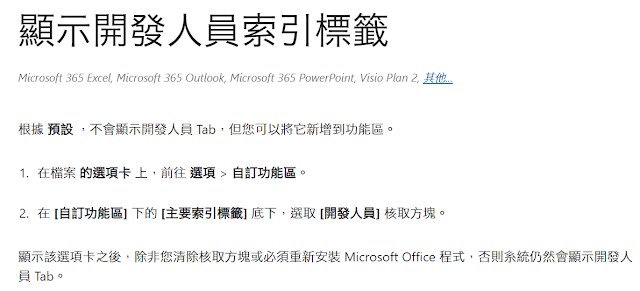
一開始當然是要讓outlook可以使用開發者功能,才能寫VBA程式。


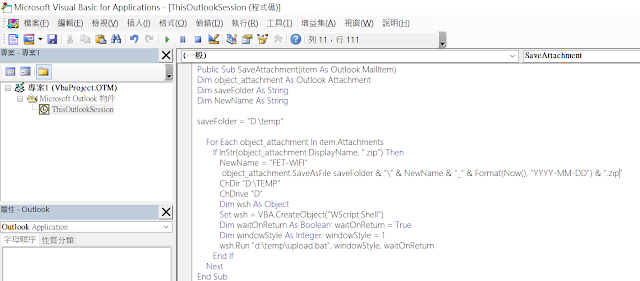
接著我們開始建立專案,把程式寫好。


最後就是建立規則,這邊的關鍵是要『執行程式碼』,不是『執行程式』。


接著把附檔丟到我的linux server上,然後linux server會去檢查檔案是否存在,在的話把它匯入資料庫。
要在outlook開發程式只能用vba,但vba要呼叫tftp一直時好時壞。難怪前輩們都是用scp或sftp....

這邊簡單補充一下,一般是用excel先做測試,先開啟開發者功能,然後允許巨集,接著插入一個模組,把程式丟到模組,就可以測試了。測試完成後,再回到outlook,用alt+F11就可以開啟VBA編輯介面(建議outlook也要開啟開發者功能並允許使用巨集),接著產生新的outlook規則,然後呼叫程式碼(我之前一直選成呼叫應用程式)

但在公司不管用tftp或scp都失敗。(有幾次成功,但...不穩定的東西誰敢用)
在家裡用tftp跟scp倒是都成功。
看來是tftp client的問題嗎或者環境問題嗎?在公司換了一個tftp client,結果輕易成功了。Windows 10預設的tftp.exe 可能在AD環境執行有一些權限限制吧?

附上簡單範例範例:
Sub uploadfile()
ChDir "D:\TEMP" ' Make "D:\TEMP" the current folder.
ChDrive "D" ' Make "D" the current drive.
Dim wsh As Object Set wsh = VBA.CreateObject("WScript.Shell") Dim waitOnReturn As Boolean: waitOnReturn = True Dim windowStyle As Integer: windowStyle = 1 wsh.Run "d:\temp\upload.bat", windowStyle, waitOnReturn
end Sub

upload.bat的內容如下:
cd d:\temp
d:
tftp.exe -i 192.168.1.2 PUT "my test.xlsx"
另外有幾個要特別留意的問題,在處理過程中比較常遇到的,雖然排除了但我沒有認真回頭去看哪些不需要。
1、vba shell timeout
2、vba shell path
3、vba dir & driver
4、vba shell mode and WScript.Shell
5、chr 34 and double quote (") , and """" & 總之就是雙引號之類的問題